OEM replacement parts

The number on the old part finds the new one

Your shoppers hold a broken part in one hand and their phone in the other. They type whatever is printed on it. Tolra finds the replacement, even when the number has changed.

  • Appliance parts
  • Vacuum parts
  • Coffee machine parts
  • Pool and spa parts
  • Small engine parts

What shoppers type, and what goes wrong

The number is printed with spaces

Problem

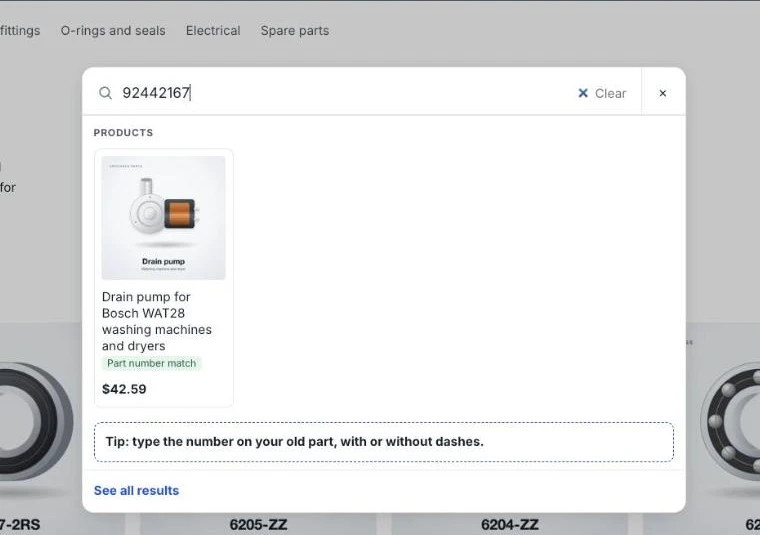
The part says 92 442 167. Your catalog has 92-442-167 in the description. The shopper types 92442167 and sees nothing.

With Tolra

OEM numbers are matched with dashes, dots and spaces ignored, in titles, descriptions ("Replaces OEM ...") and metafields.

Try it: 92442167 →

The maker changed the number

Problem

The old pump number was superseded years ago. Shoppers still search the old one, because that is what is on their part.

With Tolra

Upload old and equivalent numbers as a CSV (Growth plan and up). A search for the old number finds the current part, labelled "Replaces X".

Try it: SPX1600Z2 →

Shoppers search by model, not by part

Problem

They type dyson v8 filter or drain pump samsung. The model is in your title, but the words are in a different order.

With Tolra

All words of the search are matched across the title, tags and metafields, in any order. Compatible models written in your listings can become a filter you approve (AI filters, Growth plan and up).

Try it: dyson v8 →

Shoppers use different words

Problem

One shopper types e61 gasket, another group head seal, a third shower seal.

With Tolra

Add synonyms once and they work in both directions. The search report suggests synonyms from searches that found nothing.

Try it: e61 gasket →

Typos on a phone

Problem

berings, filtre, gaskit. Small screens, greasy fingers.

With Tolra

Small typos are corrected automatically. Part numbers are never corrected, so a wrong digit does not show a wrong part.

Try it: berings 6205 →

The part is not in the catalog

Problem

The shopper gives up and leaves, and you never learn what they wanted.

With Tolra

A "Can't find what you need?" form under the results lets them send the part number and their email (Starter plan and up). Requests arrive on your Product requests page.

Try a few searches

These run against the sample catalog on this site.

Try these

Read as Part number 92442167

Products

  • Drain pump for Bosch WAT28 washing machines and dryersAP0000 · Ferrox · Bosch WAT28Part number match: Replaces 92-442-167

For comparison, a simple text match on the same sample finds nothing.

Sample catalog of 40 products with made-up brands. The ranking here is a simplified version of the app's; part numbers and sizes are read by the same code.

What it looks like

How Tolra Search looks in a store and in your Shopify admin. Products and numbers are examples.

Part numbers, any format

With or without dashes, dots or spaces. The SKU, the maker's number and the numbers it replaces all lead to the same product.

The OEM number 92442167, typed without dashes, finds the drain pump that replaces 92-442-167

Why replacement parts search is different

A shopper looking for a replacement part rarely browses. They have one number and one job: find the part that fits. If the first search fails, they may try once more, then look elsewhere.

The number they type comes from a label, a manual or an old invoice. It might be the maker’s current number, an old one, a number from another brand, or a model number of the machine. Spaces, dashes and leading letters vary.

How Tolra handles it

  • Every number on a product counts: your SKU, the maker’s number, OEM numbers in the description or metafields, and numbers from your cross-reference CSV (Growth plan and up).
  • Formats don’t matter: 17211-ZL8-023, 17211 ZL8 023 and 17211ZL8023 are the same number.
  • The exact part is shown first and marked as a part number match, so the shopper knows it is the right one.
  • Old numbers are labelled: when a search matches through a superseded number, the result says “Replaces X”.
  • Missed searches become requests and data. The search report lists what found nothing, and shoppers can send a request for parts you don’t list.

Setting it up

  1. Install Tolra and copy your products in.
  2. Check where your OEM numbers live. If they are only in images or PDFs, they are not searchable yet; add them to the description or a metafield.
  3. If you have a supersession or interchange list, upload it on the Other part numbers page (Growth plan and up).
  4. Turn on the “Can’t find what you need?” form on the results page (Starter plan and up).
Questions

Where should OEM numbers go in my products?

Anywhere Tolra can read them: the title, a line like "Replaces OEM 92-442-167" in the description, a metafield, or the other part numbers CSV (Growth plan and up). One clean place is easiest to maintain, but Tolra reads all of them.

Can one part list many OEM numbers?

Yes. Separate them with commas or semicolons in a metafield, or add one row per number in the CSV (Growth plan and up). Each one leads to the part.

Does Tolra know which part fits which model?

Only from your data. Tolra does not ship a parts database. If the compatible models are written in your titles, descriptions or metafields, they are searchable, and on Growth and Pro, AI can suggest them as filter values for you to approve.

What happens to a request from the "Can't find what you need?" form?

It appears on your Product requests page with the search and the part number. Nothing is stored unless the shopper ticks a box to share their email, so you can reply.

Related guides

Other use cases

Industrial MRO and B2B wholesale

Maker numbers in every format, sizes from drawings, and filters that change with the category. For bearings, seals, hydraulics, motors and spares.

  • Bearings and power transmission
  • Seals and O-rings
  • Hydraulics and pneumatics
  • Motors and drives
  • Maintenance spares

Trade supplies

Plumbing, electrical, tools and fasteners. Inch fractions, metric threads and ratings understood, and quick order for trade buyers (Pro plan).

  • Plumbing and heating
  • Electrical wholesale
  • Tools and fixings
  • Fasteners
  • Valves and fittings

Auto partsSecondary

OEM numbers with spaces or dashes, fitment words from your own titles and metafields. No vehicle database is included.

  • Aftermarket parts
  • OEM parts resellers
  • Accessories
  • Workshop supplies

See it on your own catalog

Install Tolra, copy your products in, and search your own part numbers.